
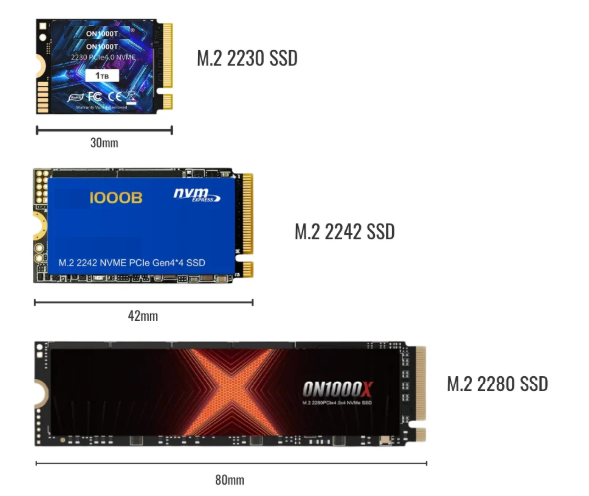
M.2 SSDs come in several different physical sizes :
- ‘2230’ : 22mm wide, 30mm long
- ‘2242’ : 22mm wide, 42mm long
- ‘2280’ : 22mm wide, 80mm long
An M.2 SSD’s connector has one of two shapes : ‘M key’ or ‘B+M key’ :
M-key are normally NVMe SSDs, which use PCIe x2 or PCIe x4 .
B+M are normally older/slower SATA devices(600 MB/sec) , but you occasionally see NVMe SSDs (usually PCIe x2). B+M SSDs will normally physically fit in a laptop/PC’s M.2 slot, even if it appears to be an M-key slot.
-
x4 means that it uses 4 ’lanes’ or channels on the PCI bus instead of 2, so in theory gets twice as much data transferred per second compared to x2 devices.
-
The version (‘Generation’) of PCIe determines the maximum speed of the interface :
| PCI interface | Gen2 | Gen3 | Gen4 |
|---|---|---|---|
| PCIe x2 | 1000 MB/sec | 2000 MB/sec | 4000 MB/s |
| PCIe x4 | 1500 MB/sec | 3000 MB/sec | 6000 MB/s |
- Each SSD and each laptop’s M.2 slot has a specification which you can look up online, which shows both the Generation and the number of lanes (e.g. ‘PCIe Gen3 x2 NVMe '
- You can normally use any Gen/speed of SSD in any laptop/PC’s M.2 SSD slot: they will adjust their speed to work correctly, a bit like RAM does. You only need to start looking into the exact spec of M.2 slots & SSDs if you plan to run a very I/O-intensive workload and want to make sure you achieve the maximum possible data transfer rate.
- Gen4 SSDs are ridiculously fast and you’re unlikely to require the performance they offer; Gen3 SSDs are more than fast enough for normal PC/laptop use.
A couple more things to watch out for :
- if you plan to use older SATA SSDs : sometimes a laptop/PC’s M.2 slot doesn’t support SATA : you can only use NVMe SSDs.
- single-sided vs. double-sided SSDs: some M.2 SSDs have chips on both sides, so they are noticeably thicker than single-sided SSDs : this can be an issue in certain slim laptops where space/clearance is limited.